TNFS Commander: a TNFS file browser for the ZX Spectrum
TNFS Commander is a two-pane file manager for the classic
Sinclair ZX Spectrum with a Spectranet network card.
Two TNFS directories sit side by side, the way Norton Commander and
Midnight Commander do on a PC, and you copy files from one panel into the other. It is
written in Z80 assembly and it runs on real hardware. You can flash it into the
Spectranet as the %tc module, or load it and run it once without touching
the flash.
What it does
- Two panels, each mounted on its own TNFS server or directory, with sorted listings and smooth scrolling
- Copy, move, rename, make directory, delete. A directory that still has files in it can be deleted recursively
- Mark several entries and run one copy, move or delete over the whole batch
- View
.scrscreens as pictures, and anything else as text - Run files by type:
.taptapes,.snasnapshots,.basand.zxBASIC programs - Mount a different server on the active panel without leaving the program, and save the host you use most as the default
What you need
A ZX Spectrum (48K, 128K, +2) with a Spectranet card, and a TNFS server to point it at. The TNFS client lives in the Spectranet firmware. The commander calls it through the card's filesystem syscalls, so whatever the card can mount, the commander can browse.
TNFS is the Trivial Network File System, and it runs over UDP on port
16384. It is the same protocol Atari and Apple II owners use with FujiNet, so the public
server lists overlap. Take an address from the
public TNFS server list, or run tnfsd on your
own PC or NAS. This site serves one at tnfs.zx.in.net.
How to install it
On a Spectrum whose Spectranet is already configured:
%mount 0,"tnfs.zx.in.net"%load""
The menu that comes up offers Install, which writes the commander into
the Spectranet flash as the %tc module so it is there on every boot, and
Run once, which loads it into RAM and leaves the flash alone. Try Run
once first.
Keys
Q A O Por the cursor keys move the selection and switch panelEnterdescends into a directory, goes back up through.., or opens the selected fileSymbol-Shiftwith3to8: view, rename, copy, move, make directory, deleteSymbol-Shiftwith1mounts a server on the active panel,Imarks an entry,Hopens the help pageCaps-ShiftwithSpacequits to BASIC
Screenshots
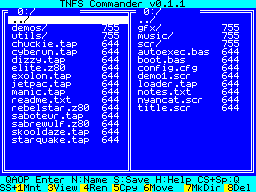
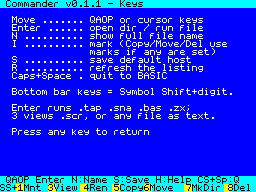
Download
- 0.1.1 Initial version
Get it
- gopher gopher://gopher.zx.in.net/1/tc
- TNFS
%mount 0,"tnfs.zx.in.net" then %load"" then pick TNFS Commander (Install / Run once)